
Smarter Brokerage Connection Recovery
A small but important improvement: your dashboard now tells you when a brokerage connection needs attention — and lets you fix it in one click.
What changed
If you use InvestSheet to track your portfolio across multiple brokerages, you know that occasionally a connection stops working. This is not a bug — brokerages periodically revoke third-party access when you change your password, update your security settings, or when they run a routine credential refresh. Until today, you would not find out until you noticed your numbers looked off.
We do not think that is good enough. So we shipped two improvements:
- Automatic detection. Your dashboard now checks the health of every brokerage connection each time it refreshes. If one has been disabled, it is flagged immediately.
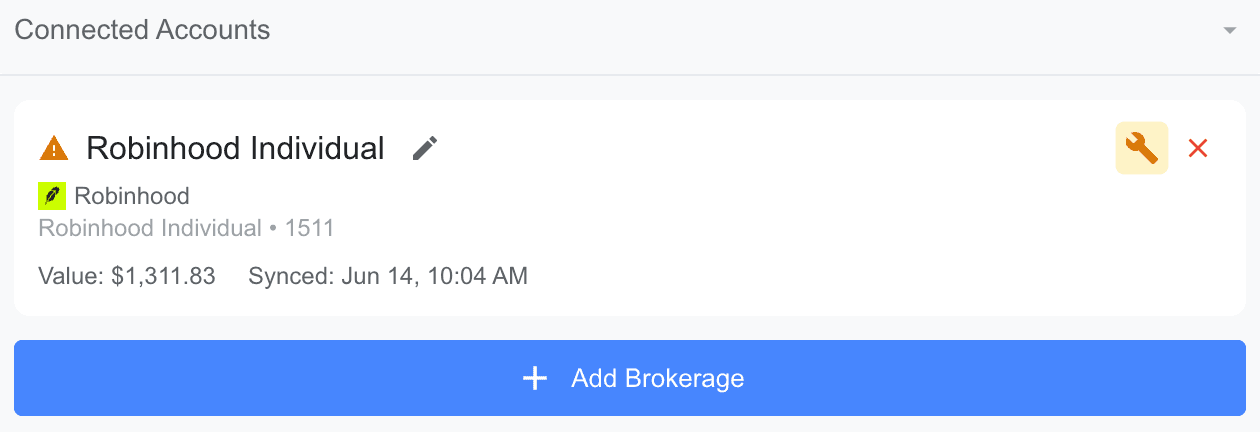
- One-click reconnect. A warning badge and a wrench icon appear on the affected account. Click it, re-authenticate with your brokerage, and the connection is restored — no data lost.
Here is what it looks like when a connection needs attention:
Why we built this
This is not a flashy feature. It is the kind of thing that only matters when something goes wrong — but that is exactly when it matters most.
We believe great products communicate honestly when something needs attention and make the fix effortless. If you trust us with your financial data, the least we can do is tell you the moment something is not right — and give you the button to fix it.
FAQ
Why do brokerage connections break?
It is not a bug. Brokerages periodically revoke third-party access for security reasons — password changes, 2FA updates, or routine security policy refreshes. We now detect this and notify you immediately.
How do I fix it?
A warning badge and wrench icon appear on the affected connection. Click the icon, re-authenticate with your brokerage, and you are done. No data is lost.
Will I lose any data?
No. The reconnect flow restores your existing connection. Your holdings, cost basis, and sheet mappings remain exactly as they were.
Not investment advice. This article is for general informational purposes only and does not constitute investment advice, a recommendation, or a solicitation to buy or sell any security. It is not personalized to your financial situation. Past performance and market moves described here do not predict future results. The specific holdings, prices, and formulas shown are illustrative examples for demonstrating a workflow, not a suggestion that you should make those trades. Investing involves risk, including the possible loss of principal. Do your own research or consult a licensed financial advisor before making any investment decision. For our full terms, see the Disclaimer.